Your financial copilot.

How much can you spend without wrecking the month?

Berio adds up your account balances, sets aside what is already promised to upcoming bills and what you have saved, and shows what is really left. With the math in the open, line by line.

Berio shows. You decide.

Create account

Works in the browser on your phone and computer. Nothing to install.

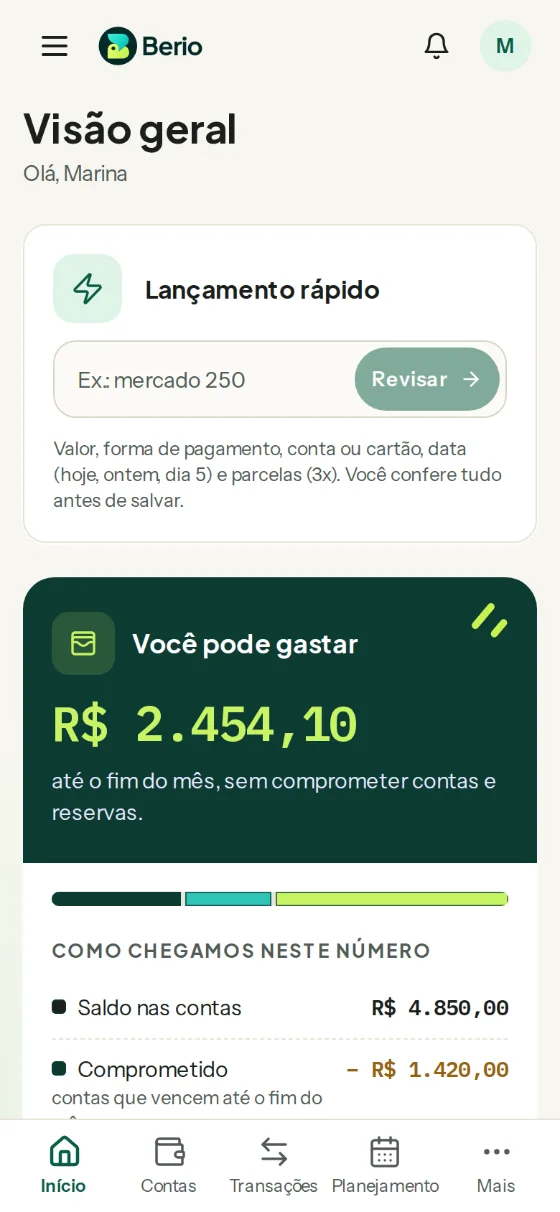
You can spend

$2,454.10

until the end of the month, without compromising bills and reserves.

How we got this number

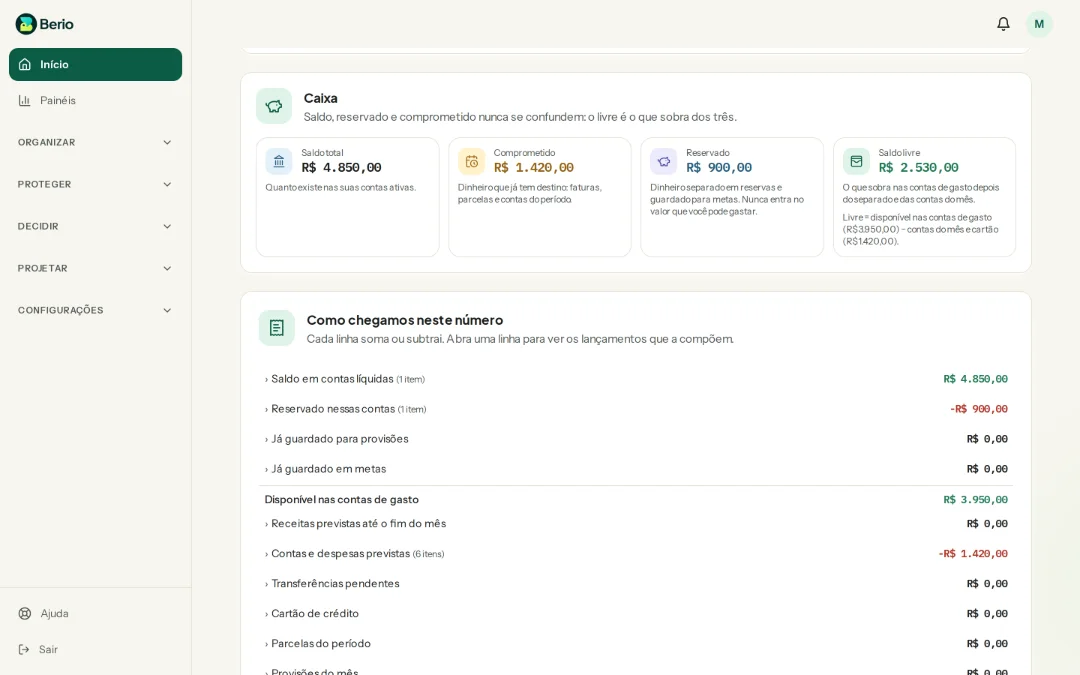
Total balance
$4,850.00
Committedbills due by the end of the month
− $1,420.00
Reservedyear-end trip
− $900.00
Free balance
$2,530.00
Safety margin (3%)
− $75.90
You can spend
$2,454.10

Example with the demo account.
The problem

Your bank statement shows a balance. Not a decision.

Your banking app tells you what is in the account. It does not tell you how much of it already has somewhere to go, and that is where the month gets tight.

  • The card bill that surprises you

    One card purchase at a time feels small. The total only shows up when the statement closes.

  • The forgotten fixed bill

    Condo fee, school, car insurance. The bill does not warn you it is coming: it just comes.

  • The end of the month in the dark

    It is the 20th, the balance is positive, and you still wonder: can I afford that dinner or not?

  • The couple without a shared view

    Each of you looks at your own account, and nobody really knows what is left for both.

How it works

Three steps to your number

The screens are from the real app, with the demo account.

  1. Tell Berio what comes in and what is due

    Balance, income and fixed bills: three questions to start. Then log spending from your phone in seconds, or import your bank statement.

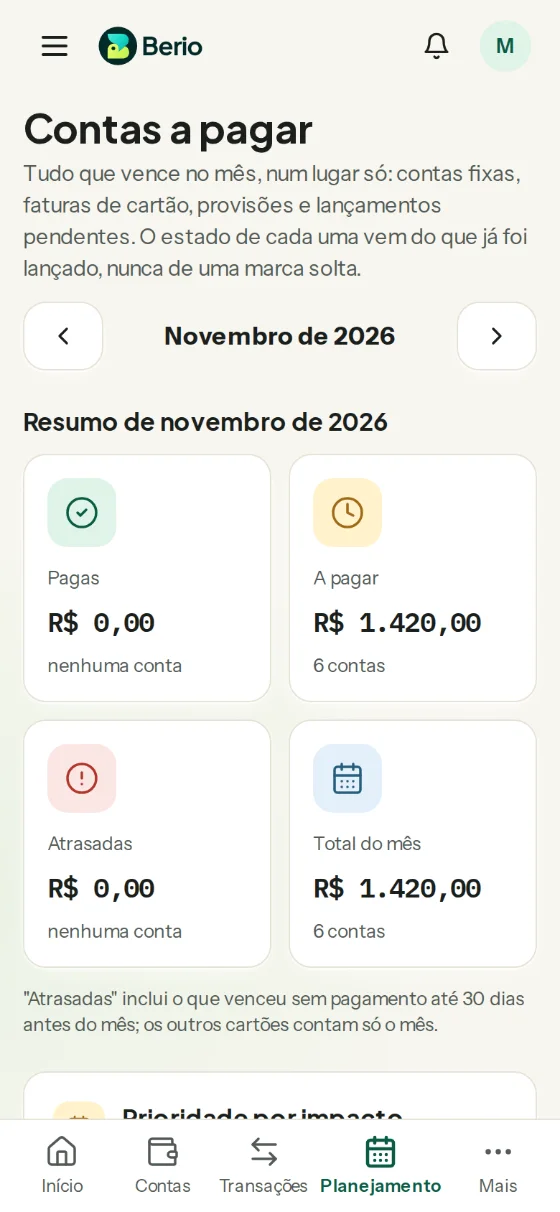
    Berio Bills screen on an iPhone, listing the bills due by the end of the month.
  2. Berio sets aside what is already spoken for

    What goes to this month’s bills is committed. What you saved is reserved. The rest is free. Four numbers, always with the same name.

    Berio Home on a computer, with total balance, committed, reserved and free balance side by side.
  3. You see how much you can spend, and why

    One number for the month, the week and the day, with a receipt for every line. Something changed? The number changes with it.

    Berio Home on an iPhone, with the amount you can spend until the end of the month.

What is inside

Everything your number needs, no spreadsheet

Start with the basics and add more whenever you want.

  • Day to day

    • Quick capture

      Type “groceries 250” and you are done. Berio reads the amount and suggests the category.

    • Accounts and cards

      Checking, savings and credit cards with statements, installments and limits.

    • Bills

      Everything due this month in one place, with a heads-up before the due date.

    • Statement import

      Bring your bank file (OFX or CSV) and review it before saving.

  • Planning

    • Reserves and goals

      Set money aside for a trip or an emergency without opening another account.

    • Budget by category

      How much goes to groceries, home and fun, and how much is already gone.

    • Projections

      Your balance for the coming months, with the assumptions in plain sight.

    • Savings challenges

      52 weeks, number grids or a goal challenge. Saving feels lighter.

  • Couples

    • Couple mode

      Share only the accounts you choose, or turn on joint mode.

    • Who logged what

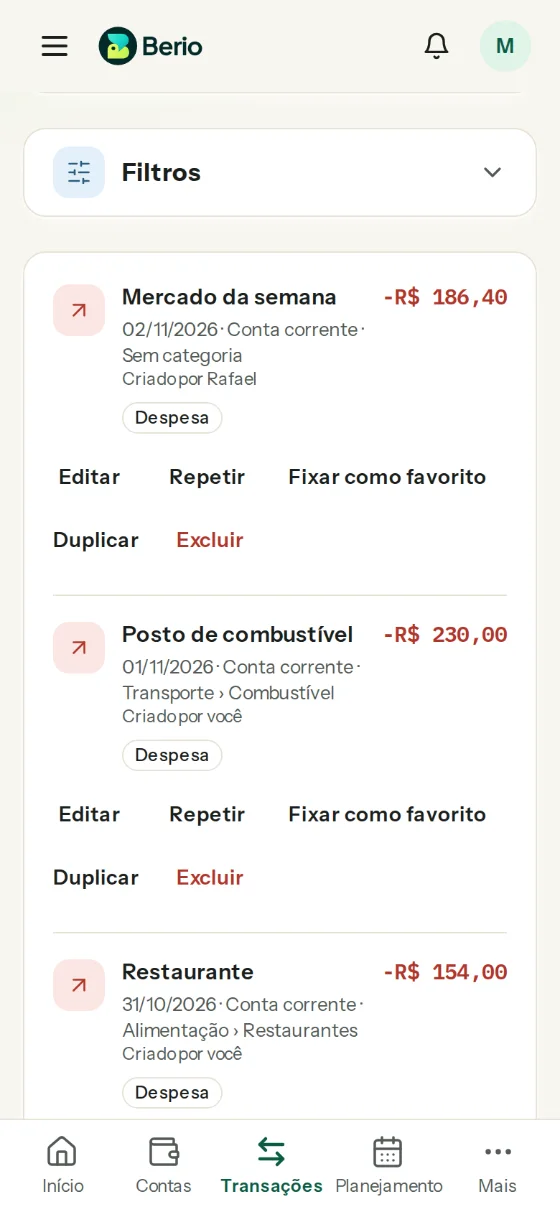
      Every entry shows the name of who added it.

    • One number for both

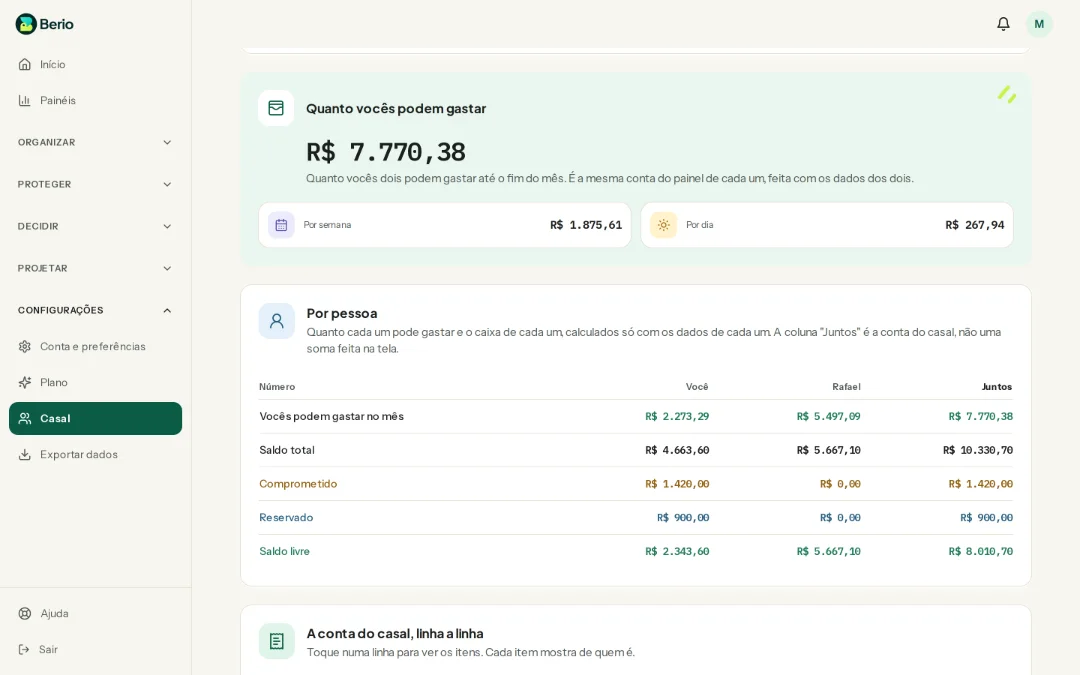
      How much the couple can spend, with each person’s part in the open.

    • Transfers between you

      Moving money from one to the other is not counted as spending or income.

Why Berio

What makes Berio different

  • The math in the open

    Every number comes with the “How we got this number” receipt. No black box.

  • Safe to Spend

    One number for the everyday question: how much can I spend.

  • Couple mode with authors

    Both of you on the same number, and every entry with the name of who added it.

  • Alerts and a weekly email

    Bills about to be due, an uncovered reserve and a weekly summary in your inbox.

  • Projections

    See your balance for the coming months before you get there.

  • Savings challenges

    Save a little at a time, at the pace your month allows.

  • No finance jargon

    Balance, committed, reserved and free. Everyday words, always with the same meaning.

  • In the browser, nothing to install

    Open it on your phone or computer. Add it to your home screen if you like.

Couple mode

Money for two, with a single number.

Each of you keeps your own accounts. You choose what to share, or turn on joint mode and see how much the couple can spend. Nothing changes without both of you agreeing.

  • Selective or joint

    In selective mode, each of you shows only the accounts you choose. In joint mode, you both log and follow together.

  • Who logged what

    Every entry carries the name of who added it. No more “who spent this?” at the end of the month.

  • What is yours stays yours

    Accounts and cards stay with whoever created them, and joint mode only turns on when both agree.

Berio couple screen on a computer, with how much both can spend and each person’s part.
The couple’s entries on an iPhone, each with the name of who logged it.

Powered by Efekty

Berio is made by Efekty. Business owners use Berio Business to run the company. Both follow the same calculation method: every number with the math in the open and the assumptions in plain sight.

How much can you spend today?

Create your account and see your number in a few minutes.

Create account